March 5th, 2008
Muted Color
]]> 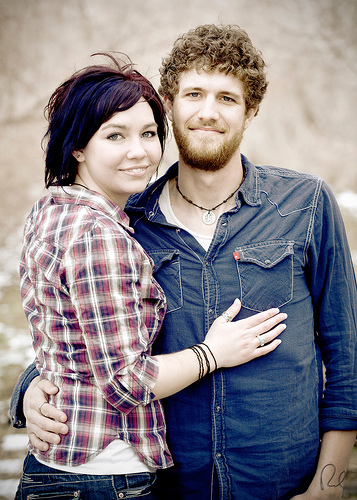
One effect that I use occasionally on portraits is Muted Color. This treatment can help to give an antique feel to the image similar to sepia-tone while still retaining color.
The young couple in today’s image wanted an old-fashioned look to their engagement photos. Their initial thought was to go with black & white or sepia-tone. However, upon seeing the muted color version it immediately became their favorite.
There are several methods available to create this look. The method I use is simple and straightforward. I process the original RAW image in three ways: color, sepia-tone and cross-processed (I use Linge’s Photoshop Actions for the sepia and cross-processed effect). I then create a Photoshop layer of each version of the file. Once I have the three layers, I use the color layer as my base and blend the other two layers over it, adjusting the transparency until I get my desired result.
If you have a process you use to create a similar effect, please share it.
Canon 5D, Canon 70-200 f/4L lens – 1/200 second, f/4, ISO 100
LeggNet’s Digital Capture
© Rich Legg, Inc. All rights reserved.